


Please submit a Support Ticket for Further Assistance.
We offer 2 ways to create a support ticket:
Visit https://support.ezable.com
-OR-
Follow the steps below and create a support ticket via Chat
STEP 1) Open Chat Icon

The chat icon is located in the lower right side of this window.
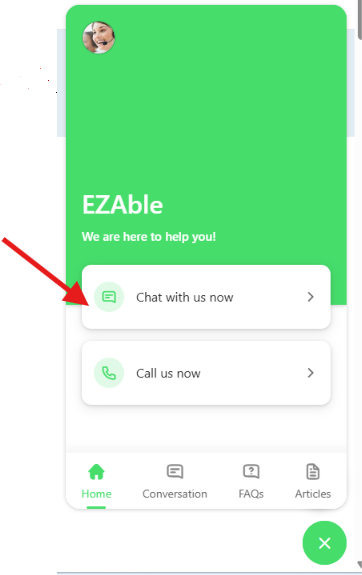
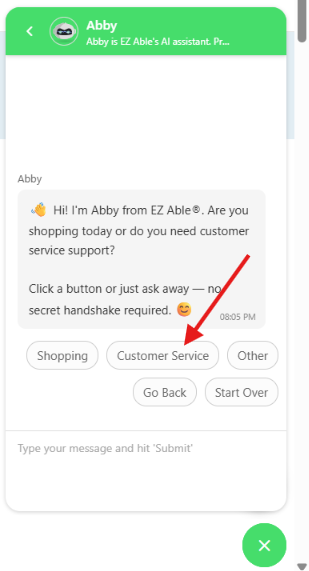
Step 2) Select Customer Service
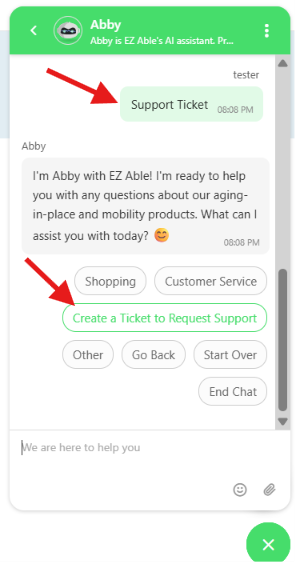
3) Enter the words Support Ticket, click Create a Ticket to Request Support and follow the instructions.
As the saying goes, a picture is worth a thousand words.
If your item is damaged or missing parts, please see Damaged Items or Missing Parts.
Please feel free to attach a photo to help describe your issue.
PLEASE NOTE: All shipping damage claims require a photo of the damage, bill of lading, and packaging.