


Damaged, Wrong or Defective Items
We know how frustrating a damaged or defective item can be.
Shipping Damage
Defective or Wrong Item
Report Damaged, Defective or Wrong Items:
We offer 2 ways to create a support ticket:
Visit https://support.ezable.com
-OR-
Follow the steps below and create a support ticket via Chat
1) Open Chat Icon and start a chat - it is located in the lower right of this screen. 
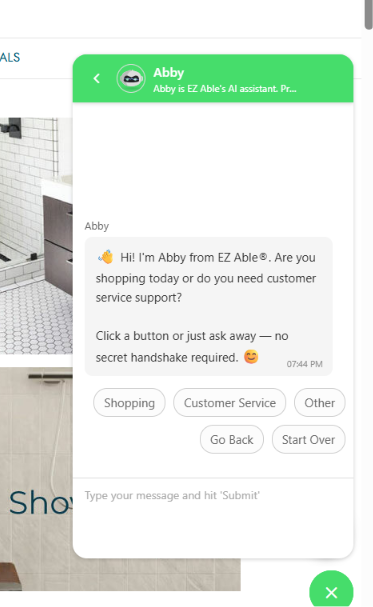
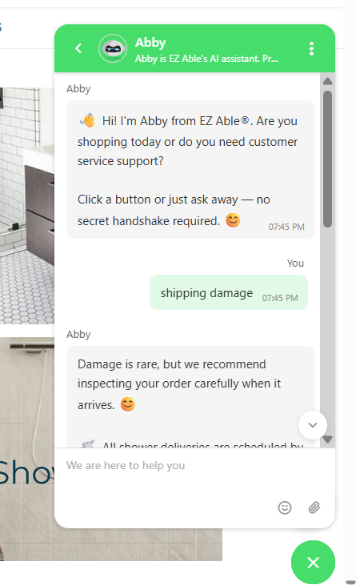
3) Choose Report Damage - Create a Ticket.
Follow instructions. When prompted, enter your Order Number, Name, Email and Phone Number . Be sure attach photos that show the damage.
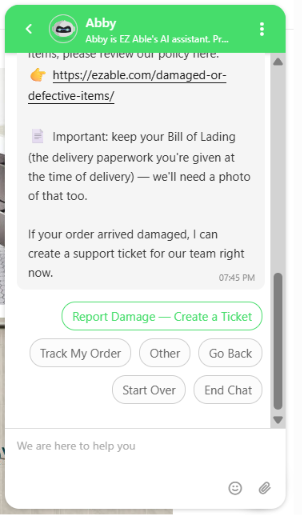
Please upload photos that display:
-
The entire item (out of the box - if safe, please inspect the item even if the packaging is damaged),
- The packaging if available,
-
Close-up and clear photos of the damage
-
Bill of Lading (The paperwork that came with your order or the paperwork that you signed.)
4) Once your request is submitted, you will receive an email confirming your resolution and next steps. Please allow 2 business days for EZ Able to process the ticket. If you are asked to return the original item, instructions will be provided via email.
How do I know if my item has a manufacturer’s warranty?
To check item eligibility, scroll down on the item’s product page, view Warranty details under the “Warranty" Tab.
What if my open box or clearance item is damaged/defective?
We can assist with open box or clearance items however resolution options are limited.
What do I do if I am instructed to return my damaged/defective item but I don’t have the original packaging?
You can return the item in its original packaging or a similar box if the packaging has been damaged/discarded.
EZ Able is unable to provide boxes or packaging for the return.